
TALENT REPRESENTATIVE: How do I take talent off "Hold"?
If talent are currently marked as "Hold," they will not appear in general or role-specific searches. This article explains how to locate those individuals and update their status so they are visible to casting directors again.
Removing a "Hold" Status
To reactivate talent and ensure they appear in searches, please follow these steps:
Using the first letter of the talent’s first name, use the Quick Search drop-down located under the Logout button on your left navigation bar.
Find the talent that you would like to take off Hold.
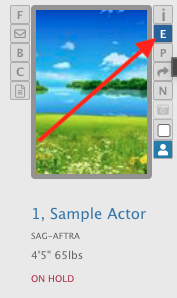
Click on the E icon located on the right side of the talent's headshot.
Below the text field titled Permanent Note in the Personal Data section, there is a drop-down labeled On Hold?

Toggle No and press the blue Save button.

Your talent is now off Hold and will appear normally in searches.