
TALENT REPRESENTATIVE: How Do I Notify Talent of Auditions and Self-Tape Requests?
This article will explain how to forward audition notifications and self-tape requests to the talent on your roster. This ensures your actors are notified promptly of their opportunities and understand how to submit their materials.
How Do I Notify Talent of Upcoming Auditions?
To keep your roster informed about their scheduled auditions, follow these steps within the Workspace:
Log in to your Casting Frontier account and navigate to the Workspace tab on the left-hand side.
Update the date range at the top of the page to view audition notifications for specific timeframes.

3. To notify your talent, click on the Notify Talent button or the Green Forward button associated with a specific audition.
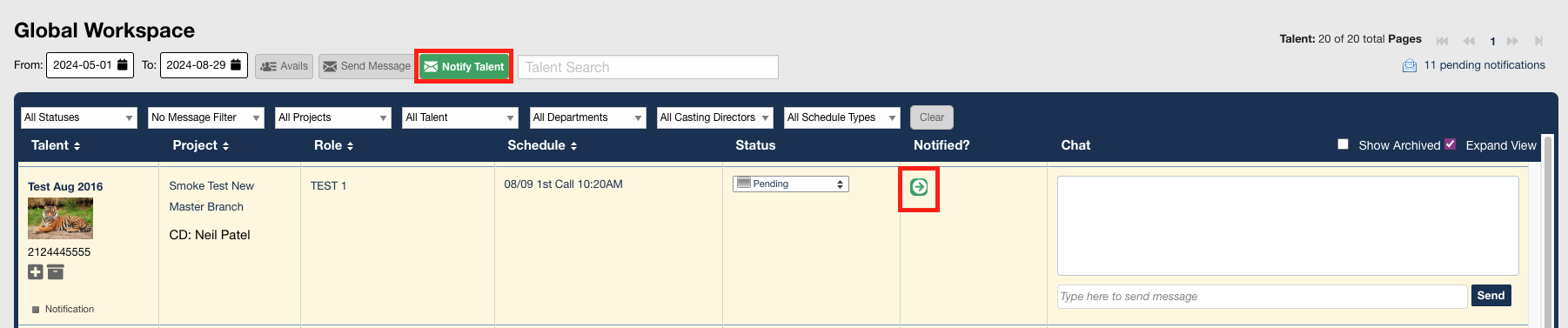
4. Once on the Send Times page, select the check marks on the left-hand side for specific talent or select all talent.
5. Click Send to complete the notification.

How Do I Forward Self-Tape Requests to Talent?
When casting sends a self-tape request, you can alert your talent directly from the Self-Tape dashboard:
1. Look at the Self-Tape tab on the left-hand menu. When new requests arrive, this tab will appear green with a number indicating how many tapes need action.

2. Click into the Self-Tape tab to view all available requests.
3. Select the check box next to the talent you wish to notify.
4. Click Send (1) Requests to Actors (the number will reflect how many you have selected).

Can I Upload Self-Tape Media on Behalf of My Talent?
If you prefer to handle the file management for your talent, you can upload their audition videos directly:
In the Self-Tape tab, locate the talent and click Upload Video.
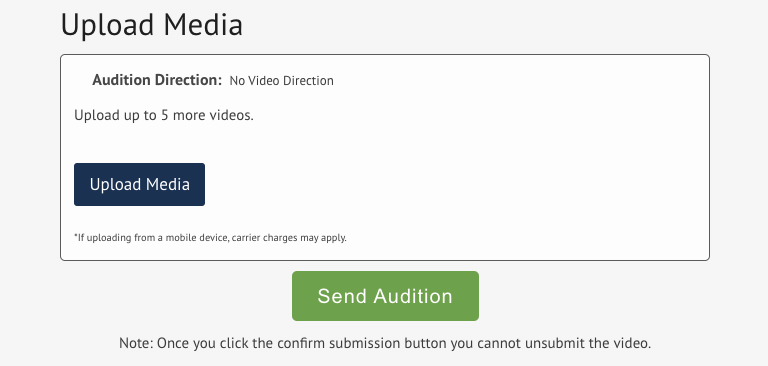
A pop-up window will appear. Scroll to the bottom of this window and select Upload Media.
Add your files (you can upload up to 5 total pieces of media per audition).
Once the uploads are complete, select Send Audition to submit the materials to casting.
Helpful Tips
Always double-check that the self-tape files meet the specific project requirements before hitting send.
If a talent hasn't confirmed receipt of an audition notification, you can resend the request from the Send Times page at any time.